|
A heads up on what’s new in presentation tools and videoconferencing technology, and how to achieve the biggest bang for the least bucks. By Glenn Baker.
If you need any reminder about the relentless pace at which technology advances, then the presentation and videoconferencing (VC) technology markets is a good place to start.
It seems only yesterday that videoconferencing was hampered by marginal connectivity and poor, inconsistent picture and audio quality. Plus VC systems were expensive to purchase and to operate. It’s no wonder many business owners opted for the likes of Skype on their PC – although compared to today the quality of service was abysmal to say the least.
Chris Stewart, GM and director of platinum Polycom reseller asnet Technologies is a veteran of the VC industry and remembers the ‘bad old days’ all too well. He says today’s buyers enjoy much lower pricing, vastly improved broadband connection (around 99 percent), “although let’s not talk about New Zealand data caps” – and almost all videoconferencing nowadays is high-definition (HD), even on the desktop if the bandwidth is sufficient.
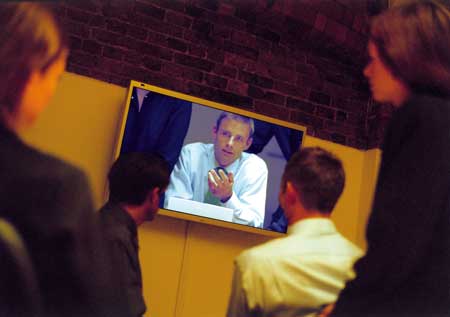
All this whizz-bang technology is then demonstrated to me in asnet’s extremely well-equipped boardroom-come-showroom in central Auckland where I’m conducting our interview. John Kandiliotis from the Wellington office is beamed in loud and crystal clear on the big screen and Stewart proceeds to demonstrate their VideoNet system’s capabilities – even linking in his own laptop. Now I can see why the industry coined the word ‘telepresence’ for this HD experience – you almost feel like the other party (or parties) are in the same room.
Surprisingly, to me, all this takes place over a standard broadband Internet connection. I can see I have much catching up to do.
“In the past two years there’s been a big move to HD and easy access products for much less money. A high end group system these days will only cost you around $7000 to $8000,” says Stewart. You get more quality for less technology he says – “for example, an HD call that took up 2Mb of bandwidth in March this year, would only take up 1Mb today – yet the quality would be the same.
“And get ready for 3D videoconferencing. In fact, the technology’s already here.”
Staying with VC, Stewart says there have been some pretty significant changes in the way it’s deployed or delivered to customers.
“Today it’s all about managed environments. The client has the relationship with the telco and access to usage stats or billing information, but we manage everything else.
“Today up to 90 percent of all HD video calls are over standard IP networks – the industry has moved from switched ISDN to IP-based conferencing – and making a videoconference call is as simple as clicking on the address book.”
This totally managed environment comes under the not-so-surprising heading of VCaaS, or Videoconferencing as a Service, and asnet Technologies recently launched its VideoNet offering to meet the market’s needs. It utilises the very latest Polycom VC systems, from desktop to boardroom level. Essentially it is one bundled service all for one single monthly fee, based on an initial 24 month contract and backed by 0800 support. The many options for this sort of service make it a very flexible and affordable solution. The use of asnet Technologies’ RMX bridge (linking) device allows more than two VC systems to be in the same call at the same time and allows systems using a mix of networks to join in the same meeting, by acting as a gateway. Stewart calls it ‘on demand, all you can eat’ videoconferencing.
“Videoconferencing is all about bringing people together in a conferencing environment as easily as possible – and that’s our aim,” says Stewart. “It’s about connectiveness between different locations and greater productivity”, and it’s a market that’s steadily growing, he says.
There’s more on the markets from Tim Fulton, country manager ANZ for LifeSize Communications. A division of Logitech, his company’s HD video communications solutions are now being distributed in New Zealand by Atlas Gentech.
“The New Zealand VC market is going through a stage of rejuvenation. Many big businesses were burnt a few years ago by traditional VC solutions that were expensive, low quality and inflexible, and are now gathering dust in boardrooms. With new and far superior HD solutions available, and spurred by the GFC, businesses have been seeking ways to manage unnecessary travel costs; videoconferencing was one way in which they could do this.
“As a result, the development of innovative products such as LifeSize’s Passport and the LG Executive, and successful implementations, has seen New Zealand businesses go through an ongoing education process on the wider business benefits HD video can offer.”
Videoconferencing is now available for everyone, says Fulton, from big business down to SMEs. “Video over IP has transformed video communications, eliminating issues such as bandwidth. With video communications now available over the Internet, rather than costly private WANs, the cost of bandwidth continually falling and new products running efficiently on lower bandwidths, we are witnessing an all-time high in acceptance and adoption.”
Shopping checkpoints
When choosing what VC system to go for be prepared to have answers to a lot of questions – such as who will be using the system? What will it be used for – large room conferencing with fewer connections and many participants or many single users joining together and using a large amount of connections? Do you need to share documents and presentations during the sessions? Are participants fixed or mobile? And how much bandwidth resource is available?
Chris Fair, product support manager at Atlas Gentech advises “you must have a detailed understanding of the user, their requirements of the system, the environments in which it will be used in and the IT infrastructure of the business.”
Dave Gee, manager visual communications for Canon Business agrees that the checklist should be headed with: who you want to connect to; bandwidth availability (upspeed is the real speed) and number of units required. “The latter is important as bridging may be needed and a central bridge with bandwidth needs to be allowed for up front.
“A good consultant will ask these questions and explain in easy to understand terms the limitations of your network and what impact this will have on other critical systems.”
Consultants are also the best people to provide tips on getting the best performance from your VC equipment.
Gee says he has many tips he could offer – “however if I was restricted to just one or two, then they would be bandwidth and room design. Get these right and it can solve a myriad of issues.
“Having the room the right colour and lighting set correctly is one of the first items on my list when I visit prospective clients and one of the questions I insist on getting the answer to is bandwidth. What overhead is your network at right now and what speed/quality will be used for video (QOS is a good idea here). Remember it is good to have more bandwidth than you need for expansion or peak times.”
Atlas Gentech’s Chris Fair believes many people think that as long as you have an expensive camera that the picture you display in a video conference will be the best possible. “While a high quality camera is important, you will always get more from the camera if you set up your environment right. The room should be well lit but not overly bright and try to minimise reflective surfaces as this will reduce the risk of bright spots within the picture.
“The same applies to the audio setup, make sure the microphone is good quality and positioned within range of all participants. Check whether the microphone is directional or omni-directional as this will affect it’s positioning. Audio pickups should be positioned far enough away from VC speakers to avoid feedback.”
|
Putting your message up there
Technology has advanced considerably on the business projector front too – the stalwart of the presentation technology sector – and the proof is right up there on the wall or screen.
Nika Maltseva, marketing manager for Epson New Zealand, says if you compare one of today’s typical projectors with one from five years ago, you’ll probably notice that its five times brighter, it’s much smaller, and the resolution will be much improved.
“It used to be SVGA, now it’s WUXGA.” That means, rather than 800 by 600 pixels, you’re getting 1920 by 1200 pixels and a 16:10 screen aspect ratio.
Other great features, says Maltseva, include user-friendly features such as the ability to wirelessly connect with a PC, and to automatically set up the image.
Perhaps the most significant recent development in this market space is the popularity of short throw and ultra-short throw projectors.
“Short throw projectors can throw up an 80-inch screen from just a metre away,” explains Peter Baldwin, technology specialist for Boyd Visuals, “while ultra-short throw projectors require less than half a metre. Compare that with a conventional projector which typically requires two and a half metres. It virtually eliminates any shadowing or image blocking caused by the presenter, and presenters no longer have to stare into bright lights.
“Entry-level brightness is now up to the 2000 to 2500 lumens mark, whereas just four years ago it was 1000 to 1200 lumens,” says Baldwin – and he says there have been big improvements in contrast ratios, plus a host of new features such as network connectivity, and PC-less presentation capability. But projectors aren’t the only presentation tool available, and “interactivity” is seeing major growth.
His picks from the new crop of presentation tools include the Hitachi Starboard, an interactive whiteboard that’s causing a stir in both the corporate and education markets; the eBeam – a device that clips onto the side of a standard whiteboard or any flat surface, enabling you to create an interactive surface almost anywhere; and the new eBeam Edge, which is smaller than a board eraser and lighter than a box of chalk, and will easily slip into your laptop bag.
“The eBeam can also be fixed for continuous use, and I know of several schools that use it to convert cupboard doors into an interactive whiteboard.”
Epson’s Maltseva is still excited about the world’s very first interactive ultra-short throw projector that Epson released earlier this year. There were three models: the EB-450We (widescreen); EB-460e and the EB-450Wi (the interactive model) released at the same time – but it’s the Wi model that caused the most excitement.
“This projector can turn any surface into an interactive surface. And the 450Wi comes with an interactive pen which enables you to control your desktop and write on the wall like a whiteboard,” she says.
Any software program using mouse and keyboard controls can be operated with the digital infrared pen including teaching software, CAD programs, digital media creators and players, graphic programs and web browsers. There’s also open compatibility with virtually any interactive software program, allowing users to incorporate and share content from multimedia, digital media files, online content, e-books, and more, without the need for interface programs.
Sourcing, managing, applying
As a rule of thumb, Peter Baldwin of Boyd Visuals says if a business uses presentation technology such as a projector more than once a month, then it’s probably more cost effective to purchase the equipment and have it on hand when needed. “For the occasional large presentation or conference, hiring from professionals is definitely the way to go.”
A big mistake Baldwin sees businesses make is settling for cheap, off-the-shelf tools that simply don’t do the job properly. “It’s false economy.”
He has other advice on the application of presentation tools too. Equipment placement and alignment is important so the screen can be easily seen and images not distorted.
With the relatively low cost of projectors now, many companies are opting to install one in their meeting room, in addition to having portable units.
“Know your equipment before you need to use it so there’s no fumbling around; this is one advantage of owning your own equipment. And avoid ‘death by Powerpoint’ – audio-visual aids are there merely to support the presentation, not be the presentation.”
As for the presentation itself? Be prepared, rehearse beforehand, says Baldwin. “Tailor your presentation to match the audience and be yourself.”
There’s no doubt that technology will continue to impact the presentation tool marketplace in a major way. Epson’s Maltseva is predicting that interactive projectors will continue to grow in popularity, due to the big cost saving over interactive whiteboards and conventional whiteboards. Expect the next generation of projectors to raise the bar further on performance too she says.
Glenn Baker is editor of NZBusiness.
|