|
I picked a bad time to research this story. With the 1st of October GST deadline looming, it seemed everybody I wanted to interview was busy preparing for the big event. Software vendors, accountants and tax advisors were frantically assisting clients to get up to speed for one of the most significant tax changes this country has seen for some years. My own accountant informs me that it has been a relatively busy year for accounting firms too, with a steady stream of tax changes from the National government.
It would be fair to say that all these changes, most significantly the GST increase, have provided the biggest test for accounting software programs and their vendors for some time – and they have required business owners to make sure that their accounting software is fully upgraded and up to the task. Vendors report that there has been a bit of a flurry of activity on upgrades. It’s the busiest it has been since Y2K days!
MYOB’s GM New Zealand, Julian Smith, has noticed a lot of “dotting the ‘i’s’ and crossing the ‘t’s’” by business owners in the lead up to the GST increase. “Many prefer to come to us for information; it’s less frightening than going to the IRD.”
He says MYOB’s free seminars held around the country to cover all the tax changes were fully booked. “The GST regime had become so ingrained, and understandably many business owners are feeling a little overwhelmed by what needs doing.”
Smith says the added stress is not just being caused by the GST rate increase and its associated transition issues – there are also the IRD’s new reporting requirements that could have business owners reaching for the headache pills, not to mention changes to PAYE, ACC, KiwiSaver contributions and depreciation. Now you know why accountants and tax advisors are also looking somewhat frazzled!
Businesses should by now have things sorted for the changeover, and in the months to come will be able to reflect on how their accounting software, and the support it comes with, performed over the whole transition period. Needless to say, as Smith notes, the cleaner your books were on October 1st, the easier the whole process will have been.
One thing’s for sure – these are indeed interesting times for the accounting software vendors, with new players entering the market, and the pressure on to really deliver the goods.
When is it time to upgrade?
Recognising when it’s time to upgrade your accounting software comes down to a lot of factors, not just major compliance changes of the magnitude we’ve seen this year.
Mike Rich, MD of Attaché Software believes that most businesses don’t know when they’ve outgrown their software. “It’s a little like getting a medical checkup – you should regularly review the situation as outlined in the new ISO 38500 Standard for Governance of IT.” In case you didn’t know, this Standard is designed to help those at the top improve business performance and control the risk associated with IT.
There are, of course, some obvious symptoms that there’s a problem.
Dr Grant Cowie, MD of Cognito (which markets MoneyWorks) suggests the following scenarios: “[Your] system is not performing, both in terms of capacity (number of transactions, products, etc) and speed (slow response or difficult to record the information now required) and in terms of information available from it.
“Also, if a business has evolved and its complexity has increased, additional features may be required – for example, departmental accounting to track internal cost centres.”
Tish Brindle, GM of Accredo, describes the warning sign as a feeling that you’re ‘losing control’. “You almost don’t know what’s happening – stock information and cashflow is not always at your fingertips. Things are not up to date, the system takes too long and you end up having to bypass it. Even your accountant can’t tell you what’s happening.”
Sue Hirst, director of CAD Partners, which operates CFO On-Call, has seen other key signs that it’s time for an upgrade too – such as: “untimely reporting; a lot of unproductive re-keying of data from paper or other electronic sources; struggling with cashflow management; and limited controls over critical assets such as inventory or working capital.”
Then again, it might simply be a case of being ready to move up from that bottom-end system that no longer adequately satisfies the needs of your business. Paul Thompson, CEO of Intersoft, a New Zealand-developed software program, says while bottom end systems offer good functionality and are great for start-ups, as the business grows the focus expands to the management of the business – not just on the daily functions such as debtors. “It’s all about a greater emphasis on management reporting – business owners need more information to know exactly how the business is performing – so the system needs to provide much more information.”
Perhaps you find you’re having to work around the limitations in your current software’s functionality; perhaps your staff are doing repetitive work which really should be automated – there’re a great many reasons to upgrade, but not the least of which is your software’s inability to integrate with other systems such as inventory, e-commerce, CRM, marketing, email or sales force automation. More sophisticated products have the ability to do this; some, such as the ABM (Advanced Business Manager) solution, does this with specialised add-on modules. Richard Goodwin, client systems manager for ABM creator Concept Engineering, says while GST has been a bit of a driver for companies to upgrade or change software, businesses have also been willing to make smaller investments in add-in functionality in order to make efficiency gains. “Businesses now want a ‘single stop shop’ – a system that is highly flexible, multi-faceted, and capable of covering a lot more bases.” As an example, the ABM product’s add-on modules include a manufacturing module which includes a detailed Bill of Materials, production planning, materials requirement planning and production scheduling. There is an e-commerce module as well.
Making sense of the options
So you’ve made the decision to invest in a new accounting software package, or upgrade the existing one, and for all the right reasons, so how do you make sense of all the options in the market?
MYOB’s Smith says first you must decide if you want a desktop or online, or hybrid model and what level of support: email, phone, face-to-face? “Most business owners want that face-to-face support from their supplier at some stage. You also need to question if you’re buying from a reputable organisation, that there are regular updates, the software complies with all legislative requirements, and if you’re storing data online, ask what level of security is offered and where the data is stored.”
Accredo’s Brindle says decision-makers need to think ahead – what do they require their system to do to get the business through the next three to five years. “And don’t just think about what’s not working with your current system; also consider what you like about it. Don’t assume you’ll automatically get the stuff you like with any new program.
“Think in terms of the outcomes you need, what [business processes] you’re trying to solve, rather than just ‘does it do X and Y?’
“See if you can find out if other companies in your market sector are using the same package and are they prepared to talk about it to you?”
The growth path is another vital consideration, says Brindle. “If the business takes off, can you increase the user licence? And who owns the licence if you stopped paying it? Would the software keep working and could you still access your data if such a situation was to occur?”
Remember that this partnership between you and your accounting software supplier is arguably just as important to your business as the one with your accountant or lawyer. So, as Sue Hirst points out, ask whether the potential supplier really understands the nature of your business and your needs, “or at least has the ability to gain that understanding. You must get really good independent references.”
Mark Blundell, product specialist for ‘cloud delivery’ pioneer Xero, says deciding on the options basically comes down to ‘what do we need and what would we like?’ “Talk to the people who actually use your current software, find their pain points and see if software can be used to ease that burden. Software which keeps your user happy will result in faster more accurate data entry, which in turn will minimise risks to the business in terms of incorrect tax filing, etcetera.”
“The software should be flexible and work the way the business does, not constrain staff to its way of doing things,” says MoneyWorks’ Grant Cowie. “This is most evident in the structure and coding system of the General Ledger and in its reporting. Customised reporting may be required, depending on the nature of the organisation.
“Ask about at the upgrade, support and maintenance costs of the indentified solutions over at least five years. Many systems have annual upgrade costs over 50 percent of the original package price.”
Apart from weighing up online verses offline delivery, which we’ll cover shortly, another main consideration centres on the word ‘integration’. ABM’s Richard Goodwin: “Why you may not have a pressing need to integrate further modules at the moment – is the system flexible and scalable enough to be able to add them in the future? In my view, the more integrated the system, the better.”
Potential pitfalls
Without doubt, the biggest mistake you can make when deciding on a new accounting software system is to choose a product based solely on initial price. The second biggest mistake is to pick a product without checking out the functionality first, and failing to get past the marketing hype.
“People often don’t spend enough time checking out a program,” says Goodwin. “And trying to properly evaluate systems using a quick 15 minute demo say, just doesn’t give you enough information and it’s easy to miss features.” Goodwin says they (ABM) offer a 30-day free trial, so it’s easy to see if the program will deliver what the business requires. “But because it’s not really possible for someone to fully evaluate a comprehensive system by themselves, we prefer that a demonstration is provided by one of our local support consultants initially.”
Julian Smith of MYOB, which offers a free 90 day trial (and 30 day online trial) on its products, agrees that trialling is vital, especially for building trust. He also says it’s important not to fall into the trap of opting for a top end solution with features and functions you’ll never use. MYOB has around 50 products and services to match up with different business segments.
Another mistake, says Smith, is not weighing up the total cost of owning the software (TCO). “For example, the subscription model may cost you say $50 a month – but by year three do you still want to be paying that amount every month? So a desktop [installed] product may seem more expensive at first, but not so by the time year three rolls round.”
He says not investing the time in upskilling and training staff on the new system is a danger too. Get all necessary staff involved he says, and don’t be afraid to ask for help – inevitably it’ll mean less mistakes.
Tish Brindle agrees – adding that the problem can be compounded when there’s staff turnover and employees end up training the new people. “It’s almost like the Chinese whispers effect, and it can lead to mistakes down the chain.”
Intersoft’s Paul Thompson cautions buyers not to just accept what their accountant gives them. “Some accountants still make money off the top of products they sell and provide training on,” he says. Although having said that, accountants can also still have a key recommending role within the decision-making process, he says.
Make sure he/she understands both your day-to-day management requirements and IT issues too – not just end of year tax issues.
Grant Cowie believes most accountants are primarily interested in compliance and may not look at the unique requirements of the business. “Good accounting software is all about business processes—the accounting is done behind the scenes. A good accountant will review your internal processes and information requirements before making any recommendations,” he says, “and there will be a cost involved.”
So what if you’re just starting out in business?
In this case, it’s crucial to consult your accountant or financial adviser, says Xero’s Blundell. “Make sure you consider both the best and worst case scenarios. Will it work if sales explode? Will it work if you need to show your financials to a bank to get further capital?
CFO On-Call’s Sue Hirst recommends that start-ups should probably start out with an online package to manage monthly outgoings, and not get tied into expensive server and licence based options until they really know what their business need is.
A lot of start-ups don’t think ahead that far and have limited cashflow, adds Paul Thompson. And they cannot afford the $5k to $15k for a full-blown accounting system. Unless they’ve been in business before, his advice is to go for the basics first – and upgrade down the track when they better understand what their management requirements really are.
That said, there are software products and suppliers that can grow with your business from day one, even when you become an employer and need that add-on payroll support – products that give you a good view of how your business is performing/trading from the start; show where the money is coming in and going out; and protect your data while making it totally accessible (after all, your data is your most valuable investment!).
Online, offline or both
You can’t ignore the slow but steady migration of accounting software access and services to the online platform – albeit in various guises, and most often referred to software-as-a-service (SaaS) or ‘cloud computing’. Some suppliers have been quick to provide online offerings, indeed Xero’s only delivery model has always been the cloud – and they’ve had great success. All the suppliers NZBusiness spoke to had differing opinions about online delivery – many are now providing the choice of online and offline (installed on desktop) versions, or a hybrid of both. MYOB is in the latter category and has recently released its latest online solution called LiveAccounts, which “brings business accounts and banking together, online” and targets sole traders, start ups and smaller businesses.
Julian Smith says the beauty of online packages is that business owners can access their accounts anywhere and anytime, and backups are done automatically. Of course, the biggest potential hiccup or frustration may be that the limitations of broadband speed mean you may not always be able to carry out complex accounting processing. All those milli-seconds spent waiting for your screen to refresh can add up to frustrating delays.
If you only spend five or ten minutes a day doing your accounts, then online should be fine, says Smith. “But if it’s more like a couple of hours per day, and you’re dealing with complex orders and processing, then efficiency may be affected.” He says offline may be the better option, or perhaps a hybrid solution.
Accredo’s Brindle, says while their product is server based, it can be accessed remotely via VPN (Virtual Private Network). She too has concerns about broadband limitations for online hosting and the fact that your data may not be hosted locally. “We’re partnering with more businesses where any downtime is not an option – and the accounting data is all mission critical.
“Processes such as just-in-time ordering, for example, are just not suitable for the cloud.”
MoneyWorks’ Grant Cowie can see ‘cloud’ delivery being chosen because the accounts are then available anywhere. “Arguably this makes them suitable for businesses spread over several locations, or for businesses with mobile sales teams. However, the functionality of current offerings is limited, and the reliability and latency of the Internet can cause major problems. One of the major downsides is that it in many cloud systems it is not possible to extract your data electronically (so you are sort of “locked in”), and even if you leave the service you have to pay them a monthly fee to keep your data because of the legal requirement to maintain it for seven years.
“Business managers should be aware that remote access to their accounts can still be achieved with hosted software – they don’t have to give up control of their accounts to a third party. This means they can enjoy many of the benefits the ‘cloud’ would offer, without the drawbacks,” says Cowie.
Of course, Xero, which has successfully championed the rise of online or ‘cloud’ software delivery in this country, demonstrates all that is beneficial to business owners of the SaaS model. “Online software allows someone else to look after many of the tasks which add no value to your core business – such as backups, data integrity checks, and updating software both for new features as well as compliance.
“Cloud delivery allows Xero to use a team of specialist infrastructure management experts to support all our users. This sort of expertise is costly when you are talking about a one-to-one relationship to support installed desktop software, but in the cloud the economies of scale make it viable to provide exceptional service at a fraction the cost.”
Whichever options you decide on, it will have its advantages and its risks, and these need to be weighed up. It’s true also that there is confusion around the expression ‘cloud computing’ and so-called ‘hosted’ options. By way of explanation, Intersoft’s Thompson says ‘cloud’ options provide a greater level of expandability – the ability to have multi tenanted systems with multiple people accessing multiple databases via the Internet. But it can be a one-size-fits-all option. Hosted options are more company specific – but they can still be ‘cloud’ deployable.
Support expectations
Accounting software is a critical element of business operation – so ensure any provider has the track record of providing timely support by phone or other personal means. “Email or knowledge base support only is not good enough,” says Grant Hewson. “Check the hours that phone support is available – for a small business a 5pm close-off is not good enough either.”
Sue Hirst, whose company is an unbiased recommender, installer and trainer in accounting software, says businesses should only expect maintenance upgrades from the software vendor. “But from the implementer or certified partner there should be a recognised set of terms and conditions, which will include some service level (for a regular fee) to ensure that your system has regular uptime. A solid relationship is key. The partner needs to be someone who is dedicated to the role of support and not likely to get distracted onto greener pastures.”
“Businesses should expect to pay only for support given, and not have to pay a compulsory monthly fee for support they may never use,” says Grant Cowie. “There is really no reason why your accounting system should require any more support than say your word processing or email client.” He says for many accounting software suppliers, support is structured chiefly to provide ongoing revenue.
For MYOB’s Smith, it’s all about making support available in all the different communication channels – to suit the way the business operates. “Whether that is face to face, phone, email, live chat, or whatever – you should expect it all to be available.”
There is nothing worse than trying to conduct business as normal when you’re experiencing account software issues – so in your documented support service level agreement look for access to support services when you need them (it’s all about responsiveness; having someone at the other end of the phone within a reasonable timeframe) and access to a helpdesk with the facility for you to log questions and receive answers to ‘how-to’ enquiries.
A final word
In a recession and its subsequent slow recovery, clients want to better understand their business – the drivers of profitability, where the money’s being made, where efficiencies can be created – and this is why people are wanting to introduce better management reporting tools, rather than just opt for the old traditional software packages – this from Paul Thompson. So developers and suppliers are having to respond to more sophisticated packages.
There’re other factors that buyers should be aware of too – this from Grant Cowie: “The accounting environment in New Zealand has not really changed for 20 years. The GST increase should not be a surprise (it’s been on the cards for almost 20 years), and should not require a paid upgrade to recent versions of software.
“The growth of the Apple Mac in the business space (driven by the iPhone and iPad) means that businesses should now be thinking of future-proofing their software investment by looking closely at software that is cross-platform.
“With the growth in online commerce, business owners should ensure their accounting system can be set up to accept data from the e-commerce function in their website. True automation stands to save them a huge amount of time and money,” says Cowie.
ABM’s Goodwin says vendors can only ignore the rise of cloud/hosting services at their peril – younger business owners especially are used to thinking outside the box, and it would be easy for a provider to get left behind. “And look for accounting systems that are capable of covering more operational bases than before.”
Attache’s Mike Rich has a blunt message for business owners. “Many SMEs still use accounting systems they installed back around the Year 2000, and the world has totally changed.” Just like that medical checkup mentioned earlier, now’s the time to get everything reviewed. “We offer a free review and report for any business with a turnover between $1 million and $50 million.”
Perhaps the best thing to come out of all the added pressure provided by this year’s GST increase is the fact that it has finally drawn management’s attention to their accounting software, and whether or not it is still ‘doing the job’ satisfactorily. By the time you read this, if it’s after October 1st, you’ll have a much better idea.
Glenn Baker is editor of NZBusiness.
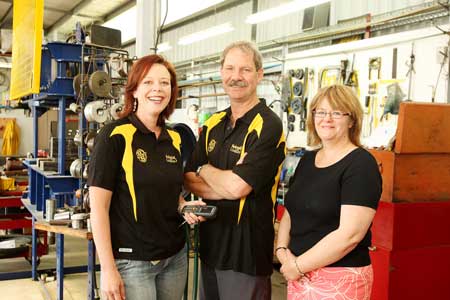
Tasj Paulson and Hugh Spence, owner of GHS with Blue House Computing’s Jill Garrett (right).
Case Study 1:
Gisborne firm gains ‘full function’ system
Gisborne Hydraulic Services (GHS), is typical of many small-to-medium New Zealand engineering businesses. The firm designs, builds and services machinery, sells parts, and undertakes bespoke equipment modification. Underpinning this broad range of activity are processes requiring the support of a flexible business software solution. When office manager Tasj Paulson went looking for a system to replace the firm’s Prophet accounting software. “We were keen to upgrade to a new system because we required comprehensive job costing functionality and also wanted to switch to bar coding to enable easier stock control,” says Paulson.
Jill Garrett, a director at local software consultancy Blue House Computing, says Tasj had a detailed spec of what the firm needed. “It went well beyond basic compliance accounting needs. They needed to improve some fundamental business operations, so we suggested Accredo because it is a full function business management tool.”
Along with job costing and bar coding, Paulson says they were keen to choose a system that would make it easier for the ‘boys’ on the shop floor to access information and complete their day-to-day tasks.
“We wanted a system that was simple to use. And I saw that the scripting flexibility inherent in Accredo would allow us to create a number of short cuts which would help everyone execute key tasks quicker and easier.”
She says the short cut key which helps shop staff initiate the invoicing process is a case in point. “With a simple piece of scripting we have made it much simpler for the guys to invoice customers for basic purchases. Rather than having to click through several screens and make decisions about what fields to fill in, with Accredo it is a one click process. All they have to do is type in the customer’s name. It is a huge timesaver.”
Invoicing flexibility is a strength of the software, says Paulson, and the ability to customise has allowed her to introduce a number of advantageous changes.
“Firstly, not all the computers that run Accredo necessarily have to have the same customisations. We can decide who needs the scripts and who doesn’t. I can stipulate what information I see on an invoice screen. I like to see margins and cost prices for parts, but for the computers at the payment counter we can exclude that information by easily hiding fields.”
Paulson says she got a taste of Accredo’s responsiveness early on when she requested some customisations to the job costing screen. “We love job costing, but we wanted some complicated reworkingof the screen options to better suit our processes. What
amazed me was that Accredo turned it round under time and under budget.”
Paulson says the new software also provides plenty of firepower on the accounting and reporting side.
“Accredo allows you to not only index a great deal of information, but it also makes it easy to extract that information and provides plenty of smart features that give me more in-depth and up-to-the-minute performance visibility.”
When dealing with over 4000 stock items and undertaking a diverse range of work, keeping track of inventory and retaining information about previous jobs is essential.
“This is where job costing and the scanner technology really help our business. Now when we start a job, we create a barcode and attach it to the job box. Any parts necessary for that job are scanned on the barcode which automatically adds them to the job sheets. We then dock the scanner and that information is automatically imported into Accredo.”
Paulson says the scanning technology has also allowed the company to improve inventory control and purchasing processes. “In the past we only did annual stock takes and never had an up-to-date picture of stock levels, we now do six or seven rolling stock takes each month across items in different bin locations.”
Paulson says 10 months into using the system they can’t fault it. “It has reduced the time everyone spends on administrative tasks and empowered our staff to take ownership of a greater range of duties.”
Case Study 2:
An enduring partnership
Deeco is a New Zealand-owned company specialising in servicing New Zealand’s water flow industry, and is a long time user of the New Zealand-developed Intersoft accounting program. To understand why this partnership has survived so long NZBusiness put the following questions to general manager Marcus Durrant:
NZB: In the 16 years that you’ve been using the Intersoft product – what improvements have you noticed?
MD: Deeco has been a long time user of Intersoft accounting programs, originally using the DOS-based Legacy and Performance versions, then moving to the Windows-based emPOWER. emPOWER is extremely adaptive to our needs and can be easily configured to our company requirements. Furthermore each user can personalise the screen views to meet their needs and how they interact with the software.
NZB: Why stick with InterSoft? What do you like about the software and the support?
MD: We did look at others before upgrading from the last generation of Intersoft to emPOWER, yet other systems diverse enough to meet our needs were extremely expensive and less adaptable – while toward the lower end, cheaper alternatives were very limiting. Full Circle provides excellent support locally and Intersoft has often provided one-off modifications at our request when we require the system to perform functions specific to Deeco.
NZB: What have been the most obvious benefits of switching from the Performer Series to Empower?
MD: Being a Windows-based software package emPOWER has really opened up our flexibility with stationary printing options, emailing of invoices, statements and remittance advice. emPOWER is also much more flexible with user options, and user security capable of being set to any degree for each user. The emPOWER reporting is extensive and again rich with options on how to present the required information. Stock control is vastly improved with simple and effective stocktake functions; stock tracking is made easy with many avenues to trace through history.
NZB: What was involved in making the switchover to the new product?
MD: Deeco had clung on to Performer for some time past emPOWER becoming available for fear of changing to something less able to meet our needs. The change-over was a significant period of learning and adapting for us, yet Full Circle Business Solutions supported us all the way and were flexible in meeting our needs while finding solutions for the few challenges we faced. While it was a little scary at first, moving to emPOWER was a massive leap forward for us in accounting software and I have to wonder now why we did not do it earlier.
I have heard Deeco being referred to as a ‘power user’ by Intersoft in the past – as we commonly take what is available from the system and tweak it a little more to meet our specific needs. Intersoft has always been very supporting to adjusting and modifying the program for us – often these things becoming standard options in future updates other users may also benefit from.
Why DIY when there’s BankLink?
Most accountants and business owners are familiar with BankLink. It’s a service that has been around for nearly 25 years, sending a business’s transactional data electronically to its accountant or advisor and providing accountants with software tools to receive and code transactions, manage client communications and produce financial reports. It means accountants virtually eliminate data entry, errors and save time. Business owners don’t need to send paper bank statements to their accountant or spend hours ‘doing the books’. There’re more than 100 different data sources now linked to the service, and a great deal more functionality has been added to the service over the years. If your accountant hasn’t already convinced you to adopt The BankLink Service, then it’s time to find out more about it.
While you’re doing that, ask about BankLink’s new online client tool called BankLink Notes Online. This program is designed for small businesses that want to turn the hours they spend on accounts into minutes. BankLink Notes Online is an electronic list of the transactions that your accountant needs more information on. For each one you simply add a short description of what the transaction was for. Then you return the file to your accountant for review.
Your accountant will compile the information and use it to prepare your GST and tax returns. A variety of management reports can also be produced – and you can either use BankLink Notes on your desktop PC or access BankLink Notes Online via your accountant’s website.
Using BankLink Notes Online means you don’t have to download files or upgrade software; you can access your file whenever and wherever you have Internet access (provided you’re running Explorer version 7 or above; Mozilla Firefox Version 3.5 or above; or Safari V3 or above).
BankLink GM sales, marketing & client relationships, Frank Woods, says BankLink offers an easy, alternative solution to DIY accounting. “It’s for those who don’t need a complicated cashbook or don’t want to do their own accounting. The time savings can be better spent concentrating on running your business or with family and friends.”
|
|